Returning trainees matched to their record
Former trainees who re-enrol are matched to their existing record and given the new course without losing any of their history.
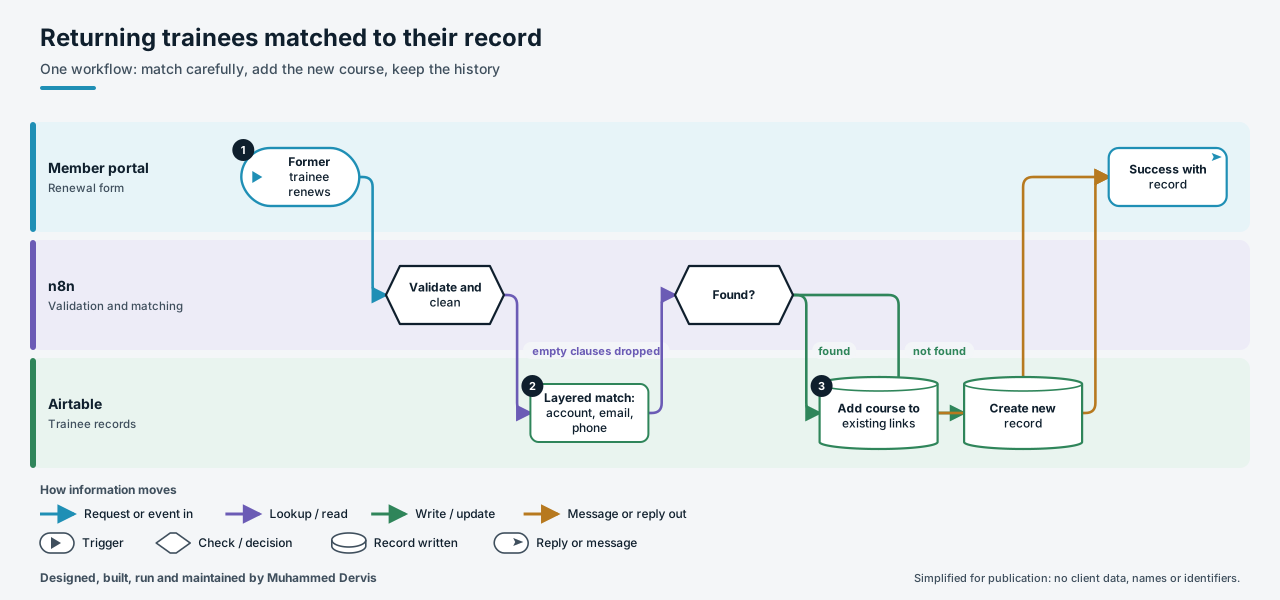
The problem
Returning trainees re-enrol through the portal, but their details may have changed, or been corrected by staff, since they last studied. Careless matching creates a second record for the same person. A careless update is worse: writing the new course over the course links silently removes every earlier course and breaks past cohort reports.
How it works
- Validate and clean. The portal posts the trainee’s account reference, contact details and chosen course. The references are validated, the email is lower-cased and checked, and the phone number is reduced to digits.
- Match in layers. The database is searched on the portal account, or the email, or the last nine digits of the phone number. Any clause whose value is empty is left out.
- Add, do not replace. If a record is found, its existing course links are read, the new course is added to them, and the record is updated and marked as returning.
- Create only when needed. If no record is found, a new one is created, leaving out optional fields that failed validation. The portal receives a success reply with the resulting record either way.
The engineering that matters
Updating a linked-records field replaces the whole list, so the workflow reads the current links and writes back the union with the new course. That one detail is the difference between a renewal and quietly erasing someone’s history.
Empty clauses are dropped from the match because an empty-email comparison would match every record that has no email. On an existing record the workflow deliberately leaves name, email and phone alone, because staff may have corrected them since.
Have a process like this?
Tell us what it looks like today. We will say whether this approach would work for you.