Finance review loop and live dashboard
Receipts reach the accountant's phone within minutes, decisions are written straight to the database, and a live dashboard rates every branch red, amber or green.
The problem
A training organisation collects course fees through representatives in many countries, in several currencies. Every payment receipt has to be checked by finance before the trainee can start. Receipts sat unnoticed until someone opened the right screen, decisions made in the member portal had to be copied into the database by hand, and the finance manager had no single view of which branches were busy, which had gone quiet and which reviews had been waiting too long.
How it works
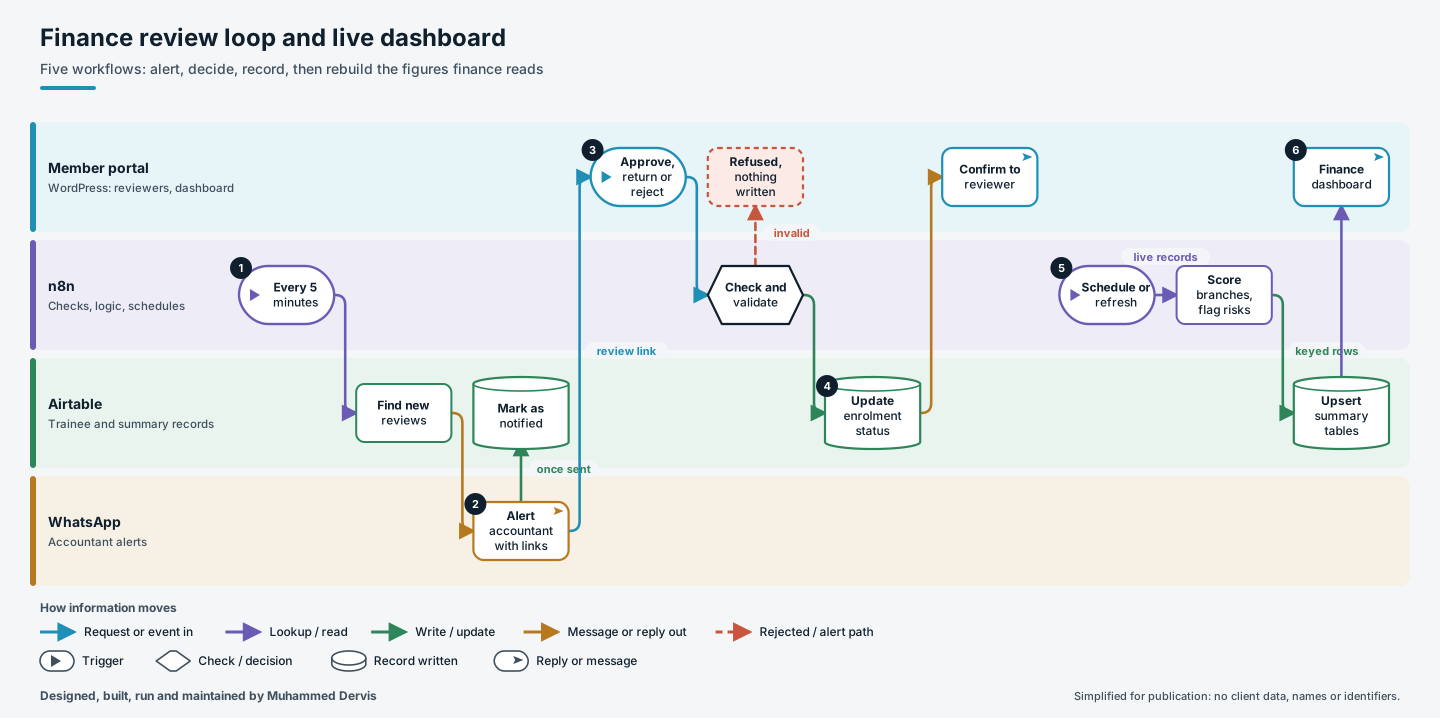
- A prompt, not a search. Every five minutes a workflow finds registrations newly waiting for review and sends the accountant one WhatsApp message per trainee, with the course, collection country, current status, a link to the receipt and a link to the review page. Each record is marked as notified once the message has gone, so it is never picked up again.
- A decision in one click. The reviewer approves, returns or rejects on the portal. Each decision has its own endpoint, but all three pass through one validator that checks the request, the record reference and the allowed action before anything is written.
- One write, one confirmation. The new enrolment status goes to the trainee’s record and the portal gets a confirmation in the reviewer’s language.
- Figures rebuilt from source. On a schedule, and from a refresh button on the dashboard, a rebuild reads the current intake, today’s registrations, the review queue and the branch list. It produces a daily summary per branch, a breakdown by payment method and currency, and a red, amber or green rating for each branch with a short reason: receipts missing, reviews waiting too long, or an official branch with no registrations today.
The engineering that matters
Each summary row is written with an upsert on a key built from the date and its dimensions. The rebuild can therefore run many times a day and simply refresh the same rows instead of piling up duplicates, which is what makes a “refresh now” button safe to offer.
Currency is handled conservatively. US-dollar totals use the recorded conversion where there is one, and a local payment still missing its conversion is counted and shown as a risk rather than silently skewing the totals. Country totals match on the linked country record, and amounts and Arabic names are normalised first, ignoring diacritics, letter variants and Arabic-Indic digits.
The on-demand refresh and the scheduled run call the same rebuild, so the two can never disagree.
Have a process like this?
Tell us what it looks like today. We will say whether this approach would work for you.