Context
The same organisation as the first two case studies. Years of recorded live sessions,
close to 50,000 catalogued videos and about 3.2 TB, sat in a general file-sharing service
and on an external hard disk, catalogued in two databases that had to stay in step. Older
sessions had partial transcripts from an earlier tool, and many videos had no cover image,
so the team browsed by file name.
The problem
Three things were not negotiable.
No video could be duplicated or orphaned. The existing catalogue record is the
identity of each file. A copy that cannot be tied back to its record is worse than no copy.
Stored is not enough. The team had to be able to open and watch every moved video,
not only know that it exists somewhere.
Many sessions show children. No video, transcript or image could ever sit behind a
public link, however convenient that would be.
What we built
The work is defined less by tools than by the rules every step had to obey.
- The record comes first. Nothing is copied until it is tied to an existing catalogue
entry. A file with no record waits for one, because in write-once storage a misplaced
file cannot simply be moved later.
- Verify, then lock. Each file’s fingerprint is checked against the source before it
is locked for five years. The account doing the copying cannot delete anything, so a
mistake or a stolen credential cannot erase the archive. This follows the first of the
NCSC’s principles for ransomware-resistant cloud backups.
- Measure the line before choosing the route. The office connection uploaded at about
10 Mbit/s, roughly ten days per terabyte. Copying directly between two cloud services ran
at around a terabyte a day, so the office disk was kept only for files that existed
nowhere else.
- Viewing behind a sign-in. Every moved video plays in the browser behind a sign-in
tied to named email addresses, with its cover image and transcript alongside.
- A cover image must show a person, or there is none. Black screens, camera-off tiles
and slides are rejected. A frame that could not be read is a failure to retry, never
proof that nobody is on screen.
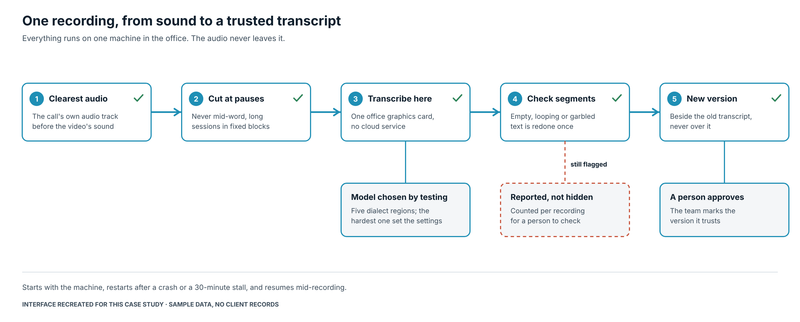
- Machine text sits beside human text, never over it. Older transcripts are kept as
they are. The machine transcript is stored as a separate version, a person marks the one
they trust, and every correction becomes a new version.
- Boring is a feature. Every job runs in the background, resumes after a restart from
where it stopped, and writes to rate-limited systems one at a time, so the team’s own
automations keep working throughout.
The result
| Measure |
Result |
| Catalogued videos moved, verified and locked |
49,379 (about 3.2 TB) |
| Files that existed only on the office disk |
2,616 moved, none failed |
| Copy speed between the two cloud services |
about a terabyte a day |
| Audio transcribed |
about 21,300 hours |
| Transcription speed |
about 32 times real time |
| Storage cost for the archive |
about US$22 a month, viewing included |
What we would tell another organisation
- Decide what identifies each file before you copy anything. Fixing identity after the
move costs far more than the move.
- Make the archive impossible to delete for the people and systems that fill it, and test
that the block actually holds.
- Ask whether your team can open what you archived. A backup nobody can view is a cost,
not an asset.
- Never let machine output overwrite human work. Keep both, and let a person choose.
- Treat “could not read” and “nothing there” as different results. Mixing them hides
problems inside clean-looking numbers.