Know when a data transfer did not finish
Scheduled exports, imports and syncs that fail without telling anyone. We add counts, logs and alerts so a short run is noticed the same day, and a safe re-run fixes only what was missed.
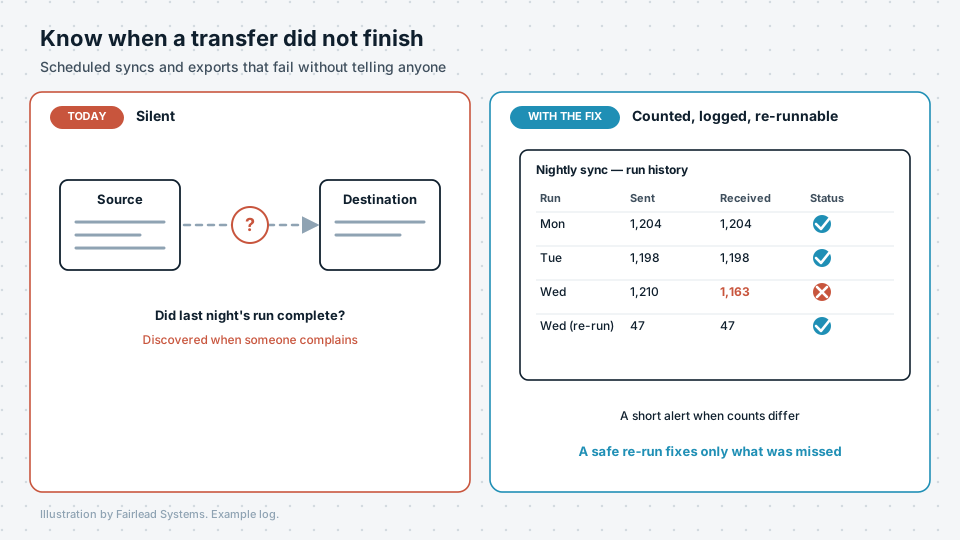
What it looks like today
Data moves between systems on a schedule: a nightly export to the finance system, a weekly upload to a partner, a sync between the CRM and the mailing tool. It was set up once and has worked ever since, as far as anyone knows.
That is the problem. Most of these transfers have no way of saying they failed. A file arrives half complete. A connection times out. A field changes name upstream and every record after it is skipped. Nothing crashes, and nobody finds out until a figure looks wrong or someone complains that their information is missing.
What we build
We add three things to the transfers you already have, or build new ones with them included from the start.
- Counts at both ends. Every run records how many records were sent and how many arrived. When the numbers differ, the run is marked as short.
- A run history and an alert. Each run is logged with its time, its counts and its result. A short or failed run sends a brief alert to a named person on the same day.
- A safe re-run. The transfer can be run again without creating duplicates, and it picks up only what was missed.
This works with the tools you already use, including Make.com, n8n, Microsoft 365 tools, scheduled scripts and direct database connections.
What you get
- A list of the scheduled transfers your organisation depends on, with what each one does and who owns it.
- Counts, logs and alerts added to the ones that matter most.
- A documented way to re-run each one safely.
Why it matters
A count check is not a full audit. It will not tell you whether the data is correct, only whether all of it arrived. That is often the most useful single fact to have, and it costs very little to add. The first article in our public record series shows what can happen without it.
Is this costing you time?
Describe how the process runs today. We will tell you whether it is worth automating, and what it would involve, before anything is agreed.