A whole class's attendance, saved safely
A class of hundreds saved in throttled groups of ten, with an instant reply to the teacher and a session that reopens itself if a group fails.
The problem
Teachers mark attendance for classes that can run to hundreds of trainees, and managers sometimes save and close a session on a teacher’s behalf. Writing every row one at a time is slow and runs into the database’s API limits. Worse, a session that is half saved with no warning leaves attendance wrong, and nobody knows.
How it works
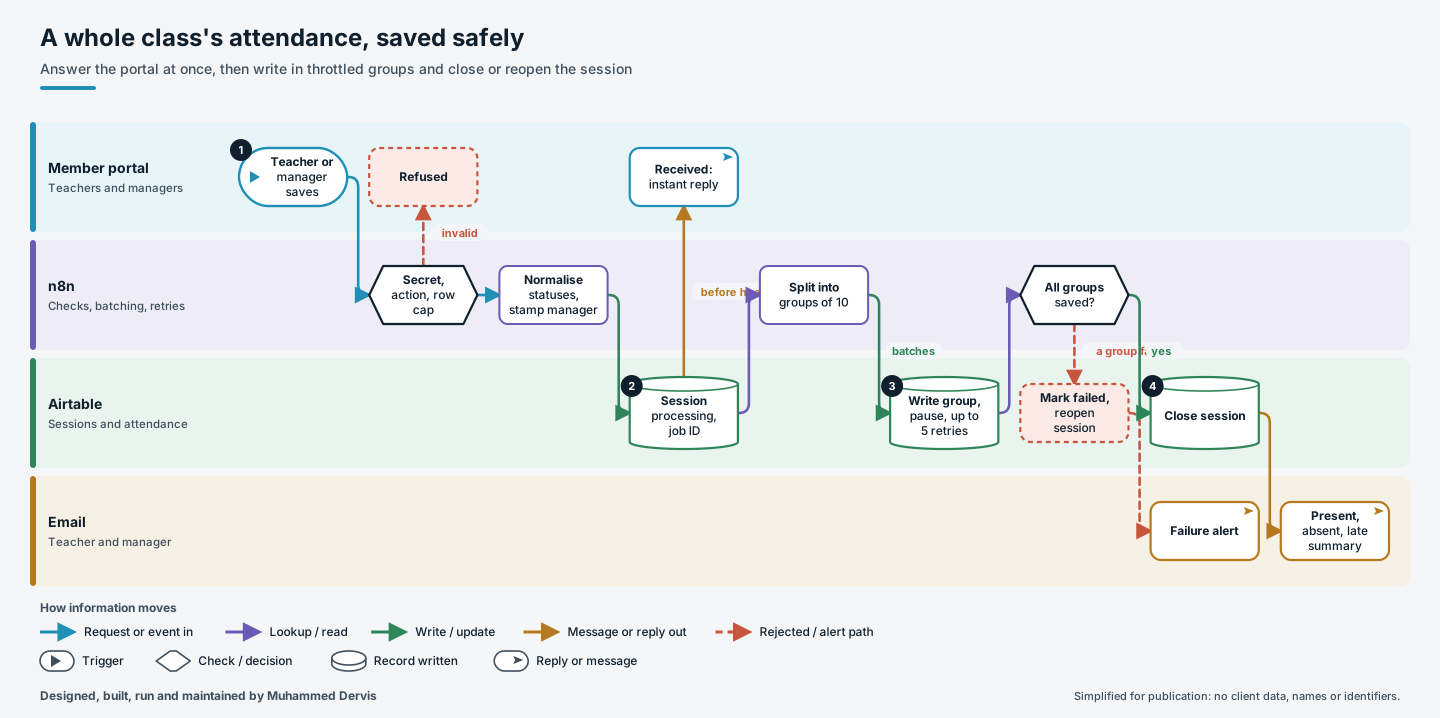
- Check the request. The portal posts the session and its rows. The workflow checks the shared secret, accepts only the allowed actions, caps the number of rows and forces every status into an allowed set. Manager saves are stamped with who did it and why.
- Reply straight away. The session is marked as processing with a job reference and the portal gets an immediate “received” reply, so the teacher is not left waiting on a spinner.
- Write in groups. The rows are split into groups of ten and written one group at a time, with a pause between groups and up to five automatic retries each.
- Close or reopen. When every group succeeds, the session is closed and a summary with present, absent and late counts is emailed to the teacher and the manager. If a group still fails, the session is marked failed and reopened for re-submission, and an alert email is sent.
The engineering that matters
The portal is answered before any heavy work starts. The writes then run in the background at the database’s batch limit of ten, throttled to stay inside its rate limit.
Failure is designed, not hoped about. A session is never left looking closed when it is not: if a batch cannot be saved, the session goes back to a state the teacher can act on, and someone is told. A manager request against a session that is already closed is detected and refused rather than applied twice.
Have a process like this?
Tell us what it looks like today. We will say whether this approach would work for you.