From course choice to the right portal access
A trainee's course choice, placement assessment and portal access kept in step by five workflows, with a dashboard that reads precomputed figures.
The problem
New trainees choose a course on the member portal, are assessed by a teacher, and must then be moved into the portal role that matches the result. Each step was copied between the portal and the database by hand, scores were added up by hand, double submissions created duplicate records, and supervisors had no quick way to see how many trainees were waiting and for how long.
How it works
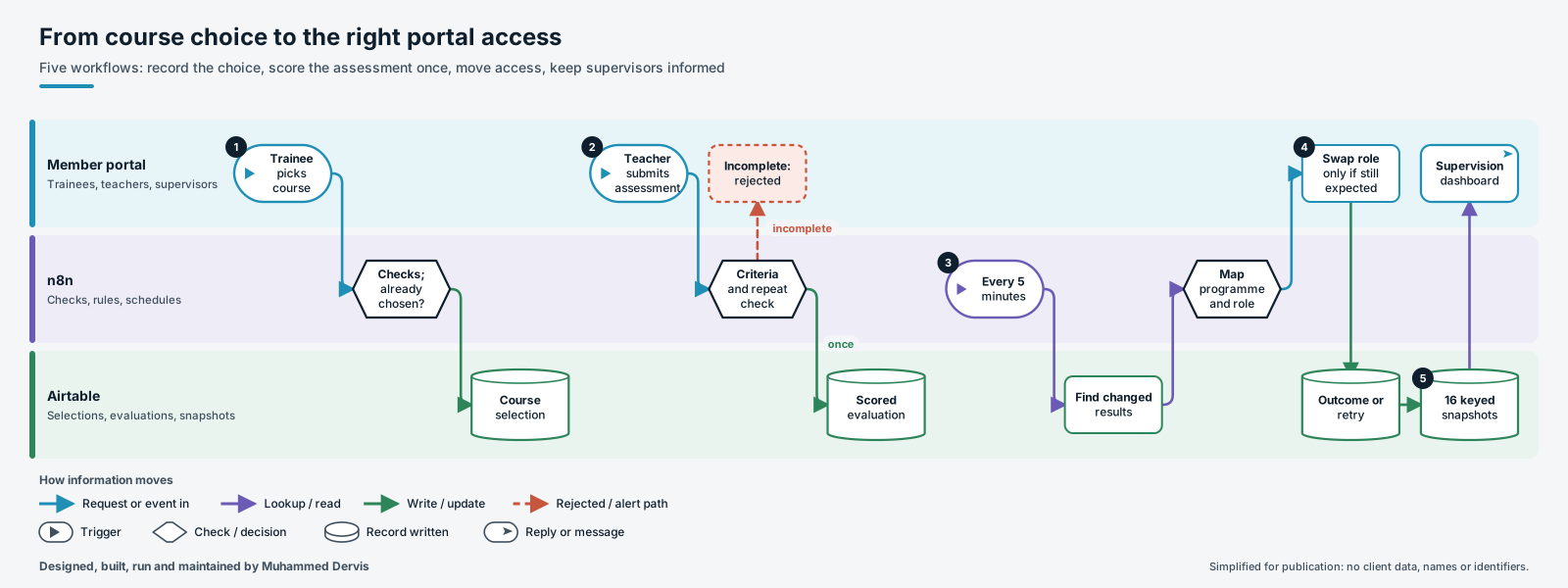
- Record the choice once. The trainee’s course choice is checked for the required fields, the trainee is found by email and a linked language record is attached where needed. If a current, confirmed choice already exists, the portal is told so and nothing is written.
- Score the assessment once. Teachers use one of three assessment types, each with its own required criteria. Incomplete submissions are rejected before anything is written. An idempotency key built from the course choice and assessment type stops a second record. The score is summed, mapped to a result band with type-specific thresholds, and stored with the recommended next step, the raw submission and the run reference.
- Find what changed. Every five minutes, trainees whose evaluation result has changed are collected.
- Move access safely. A rule step works out the programme and portal role from the result, track, group and age. The portal is asked to swap the role only if the trainee still holds one of the expected earlier roles. Each response is classed as success, permanent failure or temporary failure.
- Keep supervisors informed. Every few minutes sixteen snapshots are rebuilt, one for each combination of programme area and period, each with an alert level and recommended actions. A small endpoint serves them to the supervision dashboard.
The engineering that matters
Retries are driven by the type of failure. A change that was already applied counts as success, so re-runs do no harm. Conflicts and client errors are marked permanent with the reason. Network and server errors are left unmarked so the next run tries again. Because the swap is only requested when the trainee still holds an expected earlier role, a change someone made by hand is not overwritten.
The snapshots keep only the latest evaluation per course choice, so re-assessments do not inflate the counts, and each snapshot is written on a fixed key, so the table always holds exactly sixteen current rows. The dashboard endpoint accepts only allow-listed areas and periods and escapes the lookup value, so it cannot be used to query arbitrary records.
Have a process like this?
Tell us what it looks like today. We will say whether this approach would work for you.