Support desk: safe intake and hands-off email changes
Requests triaged on arrival with repeat submissions recognised, and routine email changes carried out end to end with each checked outcome written back.
The problem
Trainees raise many kinds of request through the member portal: email changes, seat changes, deferrals, refunds, access problems and complaints. Each needs the right category, priority and owning team. Double clicks and resubmissions created duplicate tickets, requests were not always tied to the right trainee, and an email change meant editing two systems by hand while making sure the new address was not already in use.
How it works
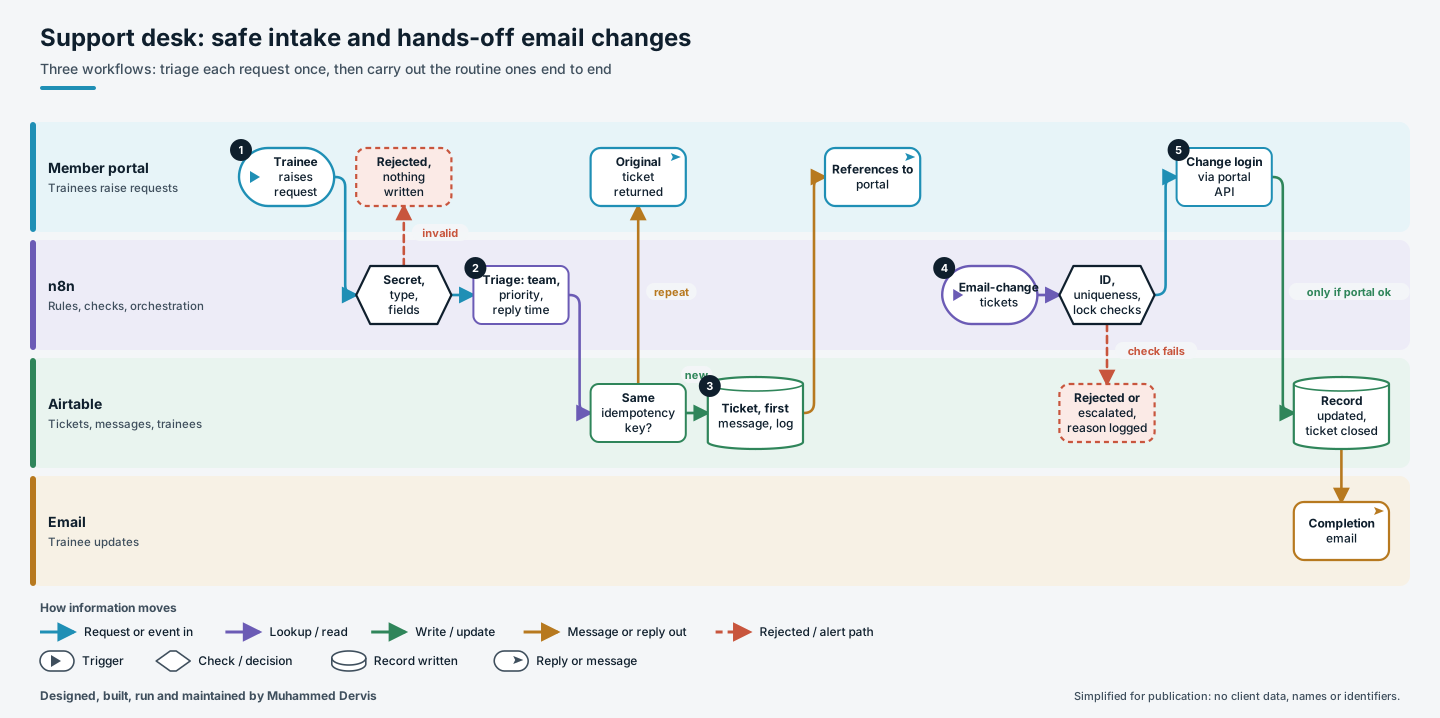
Two intake workflows serve different parts of the portal and follow the same discipline.
- Check the request. The portal posts each request with a shared-secret header. The request type is normalised, accepting several spellings of the same type, and anything missing a title or description is rejected before anything is written.
- Triage by rule. One rules step sets the classification, priority, privacy level, owning team, which roles may see the ticket, whether identity checks are needed, and a target reply time.
- Create it once. The ticket store is checked for the same idempotency key. A repeat returns the original ticket. A new request creates the ticket, the trainee’s first message and an internal log entry, all linked, and their references go back to the portal.
- Pick up email changes. Every few minutes open email-change tickets are collected and checked: valid old and new addresses that differ, an identity document attached, and the ticket open and not already locked. Failures go back to staff with the reasons listed.
- Change both systems in the right order. The old address must belong to exactly one trainee and the new one to nobody. The login is changed through the portal’s API first. Only if that succeeds is the trainee record updated, the ticket resolved and a completion email sent.
The engineering that matters
The idempotency key is checked before anything is written, so a repeat submission carrying the same key returns the original ticket instead of creating another. The trainee match is re-verified in code after the database search, so a loose search result cannot attach a ticket to the wrong person.
For email changes, each checked failure writes its own outcome to the ticket, whether waiting for staff, rejected or escalated, with the error text and the status of each system. The portal call never throws; its response is checked explicitly, and the database is only changed once the portal change has succeeded.
Have a process like this?
Tell us what it looks like today. We will say whether this approach would work for you.