Instalment plans, payments and passwordless access
Instalment plans recorded with the exact terms accepted, each later payment logged with its receipt attached, and a passwordless way for trainees to check their balance.
The problem
Some trainees pay in instalments, arranged through a representative. Finance needs complete, consistent details and a record of exactly what the trainee agreed to. Later payments arrive with a receipt that must be matched to the right agreement. And trainees want to check balances, due dates and whether a receipt has been reviewed, but many do not have, or do not remember, a portal password.
How it works
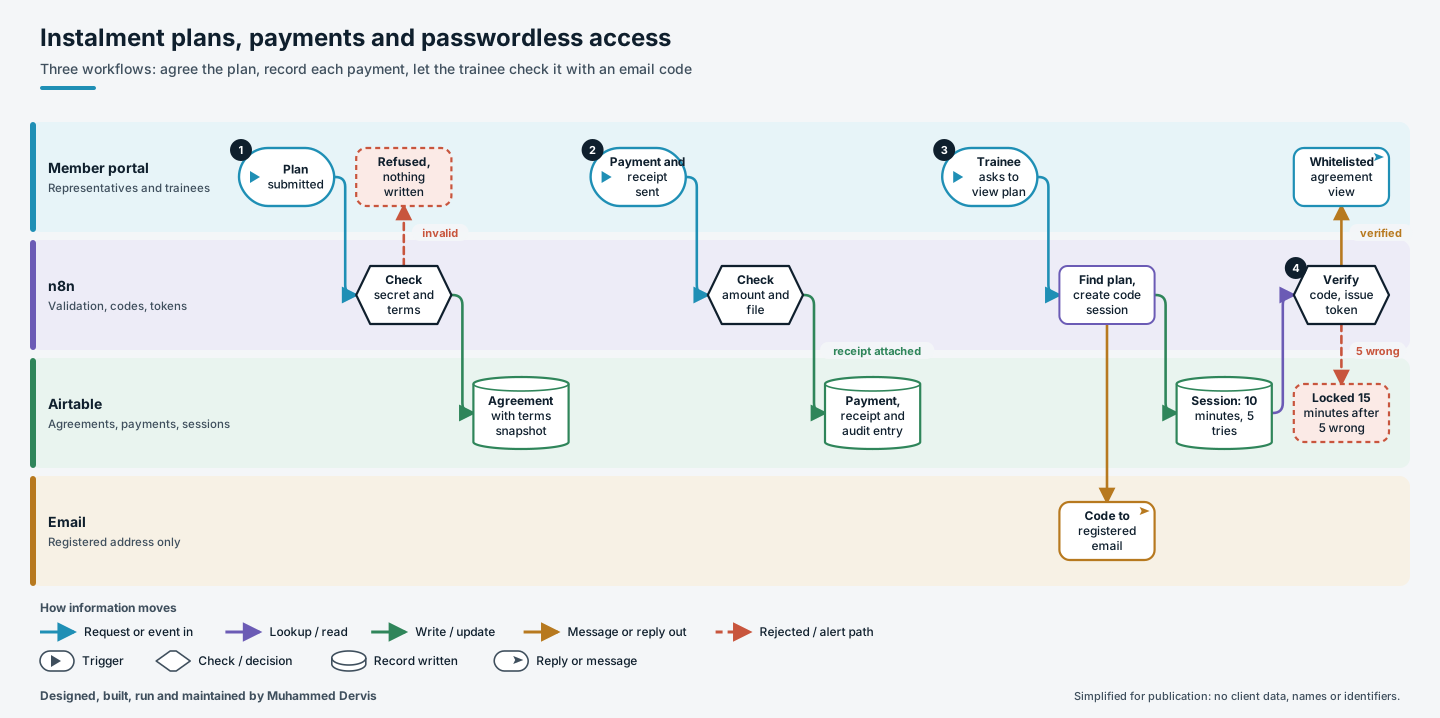
- Agree the plan. The representative submits the plan with the first receipt. The request is checked, amounts must be positive and a receipt file must be included. The agreement is created with its finance and review statuses, the identity of the representative, and a snapshot of the terms text and version at the moment of acceptance.
- Record each payment. A later payment is validated for agreement, amount, currency, method and file, recorded as pending finance review and classed as a remaining or extra payment. The receipt is uploaded straight into the payment record, the agreement moves to “under review”, and an audit entry stores both a machine-readable snapshot and a readable summary.
- Ask for a code. A trainee enters their email or phone number. The input is normalised, including Arabic-Indic and Persian digits, the agreement is found, and a six-digit code is emailed to the registered address. The page sees only a masked version of that address.
- Verify and view. The code expires after ten minutes. Five wrong attempts lock the session for fifteen minutes. A correct code issues an access token valid for one hour, and only a whitelisted set of agreement fields is returned.
The engineering that matters
The code session is a small state machine: pending, verified, expired or blocked, with attempt counting and a timed lockout. A lookup that finds nothing returns a neutral message, so the page does not reveal which emails or numbers are registered.
Storing the terms as a snapshot means later edits to the terms cannot change what a trainee agreed to. Optional fields are only sent when they have a value, so an empty date never trips the database’s validation.
Have a process like this?
Tell us what it looks like today. We will say whether this approach would work for you.